5 - Angular Motions
Turning motions are the simplest motions LemLib can perform. All of the motions will rotate the robot in some way, and only use the angular PID controller.
Turn To Heading
See also
turnToHeading and TurnToHeadingParams API references.
This motion turns the robot to face a certain angle. This angle is absolute, meaning turning the robot to face 90 degrees will always cause the robot to face the same direction.
The function has two required arguments, the angle to turn to (in degrees), and the timeout. This is a hard time limit for how long the movement can take (in milliseconds). After this time period has elapsed, the movement will end, no matter how complete it is.
Here’s an example of the simplest call you can make:
chassis.turnToHeading(270, 4000); // turns the robot to face 270 degrees,
                                  // with a timeout of 4000 ms
lemlib::Chassis::turnToHeading() also has to more optional arguments, which can be used to customize the behavior of the movement.
The first is params which is a struct containing named settings, and async, which controls whether the movement blocks execution or not.
Here’s an example of the same function call from above, but with all of the default values filled in:
chassis.turnToHeading(
    270,
    4000,
    {.maxSpeed = 120}, // will never exceed 120
    true // this motion will not block execution
);
Turn To Point
See also
turnToPoint and TurnToPointParams API references.
turnToPoint motions work exactly the same as turnToHeading motions, except they target a point in Cartesian coordinates on the field, instead of a heading. This is particularly useful if you want to turn to face a game object with a fixed position, regardless if your position on the field.
Tip
For the best results, don’t attempt to turn the chassis to points within 10” of the chassis. You’ll get better results the farther away the point is from the bot.
Here’s an example of how you’d use it:
// turn to the point (53, 53) with a timeout of 1000 ms
chassis.turnTo(53, 53, 1000);
Similar to turnToHeading, the motion also takes two optional arguments, params and async.
Swing to Heading
See also
swingToHeading and SwingToHeadingParams API references.
Swing motions are unique in that they only use half the drivetrain to move.
Here’s an example of how you’d use a swing turn:
chassis.setPose(0,0,0); // the robot now things that its at (0,0) with heading of 0 degrees
chassis.swingToHeading(45, 4000); // swing to face 45 degrees, with a timeout of 4000 ms
The following illustration shows that this motion looks like if everything worked successfully:
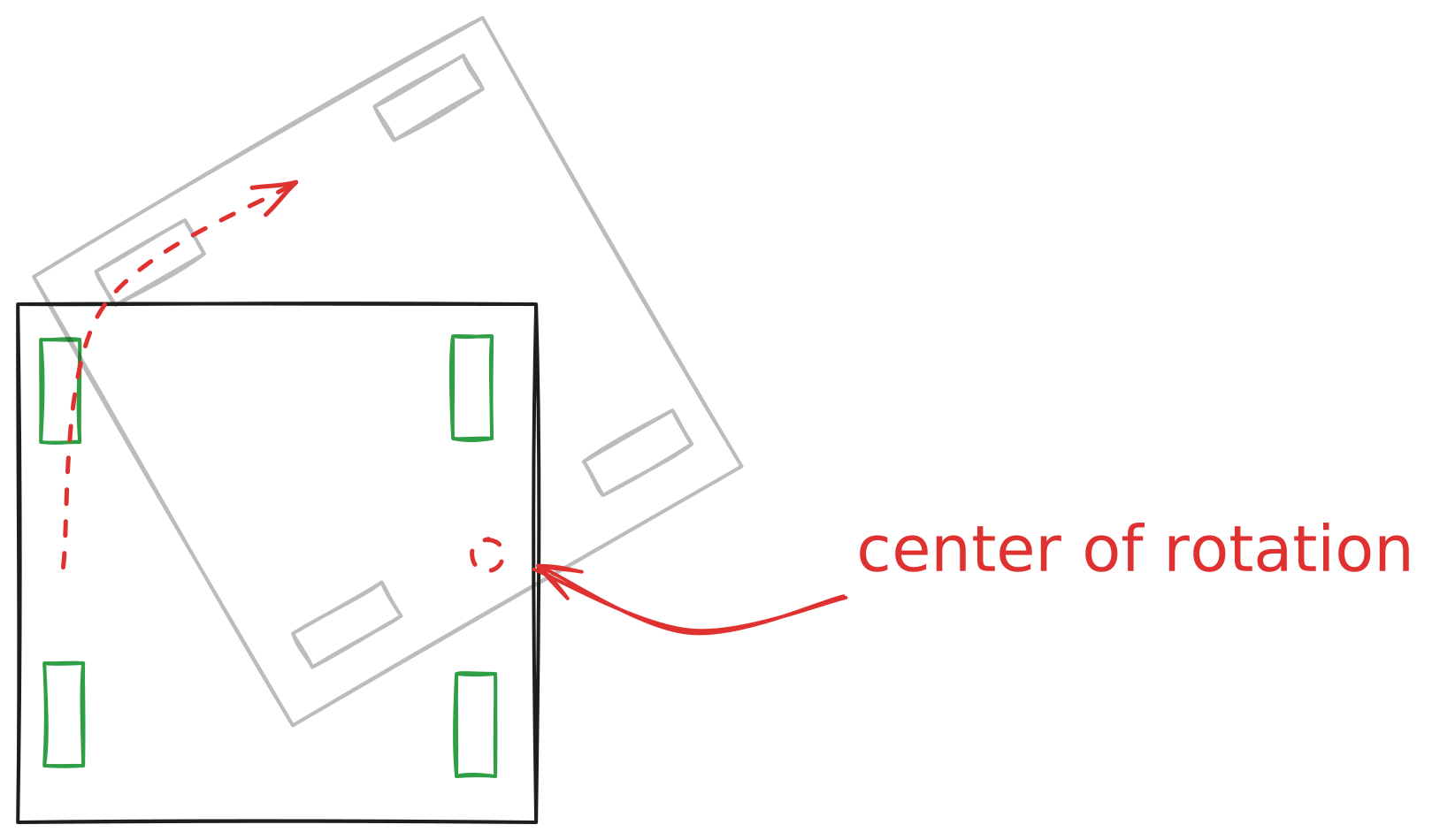
As with all the other turn motions swingToHeading also takes a params and async argument, which works exactly like the others do.
Swing to Point
See also
swingToPoint and SwingToPointParams API references.
swingToPoint works exactly like swingToHeading, except it turns to face a point rather than a heading.
chassis.swingToPoint(53, 53, 4000); // swing to face the point (53, 53) degrees, with a timeout of 4000 ms
As with all the other turn motions swingToPoint also takes a params and async argument, which works exactly like the others do.